
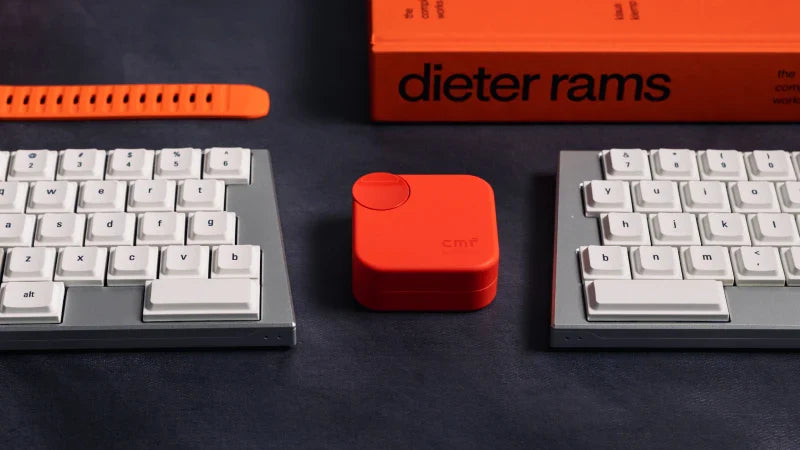
Are you tired of wrist pain, shoulder strain, or that lingering feeling of fatigue after a long typing session? You’re not alone. Millions of desk workers, programmers, writers, and gamers experience discomfort tied to traditional keyboards. The culprit? Often, it’s the rigid, one-size-fits-all design that forces your body into an unnatural position.
Enter the Ultra-Light Wireless Split Keyboard – not just an upgrade, but a fundamental rethinking of how we interact with our computers. This isn't a niche gadget for enthusiasts anymore; it's becoming an essential tool for anyone who values health, comfort, and peak performance.
The Problem with the Monolith: Traditional Keyboards
A standard keyboard locks your shoulders into a narrow, inward rotation. Your wrists bend outward (ulnar deviation) to reach the keys, and your hands sit unnaturally close together. Over time, this posture can contribute to Repetitive Strain Injuries (RSI), carpal tunnel syndrome, and chronic tension. The weight and cables add to the clutter, restricting your movement and setup flexibility.
The Split Solution: Align with Your Anatomy
A split keyboard does exactly what its name suggests: it separates into two independent halves. Why is this revolutionary?
-
Natural Shoulder Alignment: You can position each half shoulder-width apart, allowing your arms to rest in a neutral, relaxed position. Your shoulders can open up, relieving upper back and neck tension.
-
Neutral Wrist Posture: With each half angled to match the natural splay of your hands, your wrists remain straight, eliminating harmful bending.
-
Customizable Typing Angle: Many splits allow tenting (tilting the inner edges upward), which further promotes a handshake-like, ergonomic position for your forearms.
Why "Ultra-Light" and "Wireless" Are Game-Changers
This is where our Ultra-Light Wireless Split Keyboard takes the concept to the next level.
-
Unparalleled Freedom & Flexibility: The wireless connection (usually via robust Bluetooth) banishes cables from your desk. Pair it with your laptop, tablet, or even smartphone. The ultra-light design means you can easily reposition the halves throughout the day, use it on your lap, or take it anywhere. Your workspace is no longer defined by cable length.
-
Reduced Muscle Strain: A lighter keyboard requires less effort to move and adjust. This subtle reduction in resistance, combined with the ergonomic split, means your muscles work less, leading to greater endurance.
-
Clean, Minimalist Aesthetic: Without wires and with a sleek, lightweight profile, your desk transforms into a clean, modern command center that fosters focus.
Who is This For? (Spoiler: It's For Everyone)
-
The Remote Professional: Boost your productivity and comfort whether you're at a home desk, coffee shop, or co-working space.
-
The Developer/Programmer: Reduce fatigue during marathon coding sessions. The split design often pairs perfectly with layers and macros for efficient shortcut use.
-
The Creative Writer: Keep the words flowing without being interrupted by aches and pains.
-
The Wellness-Conscious User: Proactively invest in your long-term physical health. It’s preventative care for your most valuable tool: your body.
-
The Tech Enthusiast: Experience the cutting edge of personal computing peripherals.
Making the Switch: It’s an Investment in Yourself
There’s a short adaptation period as your muscle memory adjusts to the split layout. But most users report that within a week, not only are they typing comfortably, but they also can’t imagine going back to a cramped, traditional board.
The discomfort you feel isn’t normal—it’s a signal. Listen to it. An Ultra-Light Wireless Split Keyboard is more than a typing tool; it’s a commitment to comfort, health, and sustainable productivity.
Share:
Beyond the Hype: The Tangible Benefits of an Ultra-Light Wireless Split Keyboard